Measure, quote, dispatch and prove every job.
MS Rollout is the Android app and web portal that takes a job from the first measurement to the last photo: draw it on the satellite map, send a quote your customer signs online, put your crews on the run list and keep time- and GPS-stamped proof of every visit. Even where there is no signal.
3-month free trial with 30 seats, no card needed · then $59.99 a month with 1 seat, extra seats $25 a month · 30-day money-back guarantee
- Satellite measuring
- Online signatures
- Crew GPS
- Photo proof
- Punch clock
- QuickBooks files
- Invoices & online payments
- English, Spanish, French, German
Works with no signalSaved on the phone, synced later
App and web portalCrews on Android, office in the browser
Your data is yoursNo ads, never sold, export any time
30-day money-backOn your first payment
Paper, group texts and memory cost you jobs and money
Quotes written at night, crews calling for the next address, hours on scraps of paper, and no proof when a customer says you never came. MS Rollout puts all of it in one place your crews actually use.
BeforeMeasuring with a wheel, pricing in a spreadsheet, typing the quote at the kitchen table.
With MS RolloutDraw the area on the satellite map from the truck. Your prices fill in, and the quote PDF is ready to send.
BeforeCalling the customer back three times to hear "yes", then hunting for the signed paper.
With MS RolloutThe customer gets a link, reads the quote and signs on their phone. Every phone in your company sees the answer.
BeforeCrews phoning the office for the next address, nobody sure who is where during a storm.
With MS RolloutA run list on the map with numbered sites, the crews' positions and the status of every stop.
Before"Were you even here?" A slip-and-fall letter, and only a camera roll to answer it.
With MS RolloutEvery visit stamped with time and GPS, before and after photos, and a proof log PDF per site.
Built for the work you do outside
Pick the trade and each screen shows only what belongs to it: its job types, prices, sites, jobs, invoices and run lists. Customers, people and machines stay shared: winter and summer in one company account.
Snow removal
Storm run lists, crews on the map, and a time- and GPS-stamped photo record of every visit for when a slip-and-fall claim comes in.
Snow removal software →Landscaping
Measure lawns and beds on the satellite map, price each item, get the quote signed online and send the crew with a job sheet.
Landscaping software →Paving
Draw the area with exact side lengths, get the build-up and tonnage per layer, quote it, and keep change orders on the same job.
Paving estimate app →From first measurement to the last photo
Quote from the truck, not the kitchen table
Draw lots, driveways, lawns and walkways on the satellite map with tools like a simple CAD program: exact side lengths, arcs, fillets, snaps and cut-outs. Pick the job type and your own prices fill in.
- Fast quote from set prices, or a detailed one with costs and profit
- Each item has its own price; the customer accepts or declines the quote
- Paving build-up: thickness and tonnage per layer, in US tons or tonnes
- A clean quote PDF with your logo, terms and validity
Get the "yes" the same day
Send the quote for online approval. Your customer opens the link, reads the PDF and accepts and signs with a finger, or declines with a note.
- The signed answer reaches every phone in your company
- The estimator gets an email; the customer gets a copy
- The signature, name and time are kept with the quote
- Extras asked for on site become change orders to approve
Proof for every visit, one PDF away
Each visit carries the arrival and departure time, the GPS position and before and after photos with their own time and place. Skipped or delayed stops keep their reason.
- Proof log PDF per site and period, ready to send
- Records to answer a slip-and-fall claim or a billing question
- "On my way" and "job done" emails with the after photos
Hours that add up without the paper
Crews clock in and out with the clock button at the bottom left of the map (green in, red out), and crew chiefs can clock in their crew. The automatic job clock (on unless you turn it off) puts the paid day's time where people are: Arrived and Done, or the GPS within the arrival distance of a site (50 m / 165 ft unless changed) and 200 m of the shop. The office sees who is on the clock, hours per person and per week, where each day's time went (the shop, travel, each job) and time spent on each site; each person has an hours calendar with their banked hours, and can be asked about lunch at clock-out.
- Hours per person, per site and per week
- Managers fix a forgotten clock-out
- Export hours to CSV or Excel for payroll
The whole company on one screen
At app.msrollout.com, managers see what needs attention today, the worst first: late payments and late jobs, work ready to invoice, new quote requests, quotes about to expire and messages that did not go out; then open run lists, sites done and who is on the clock.
- Estimates, customers and sites, dispatch with the map, work done
- People, roles and what each role may do
- Chat with your crews, and with MS Rollout support
Try the sample account: the portal with a made-up company, to click through before you sign up.
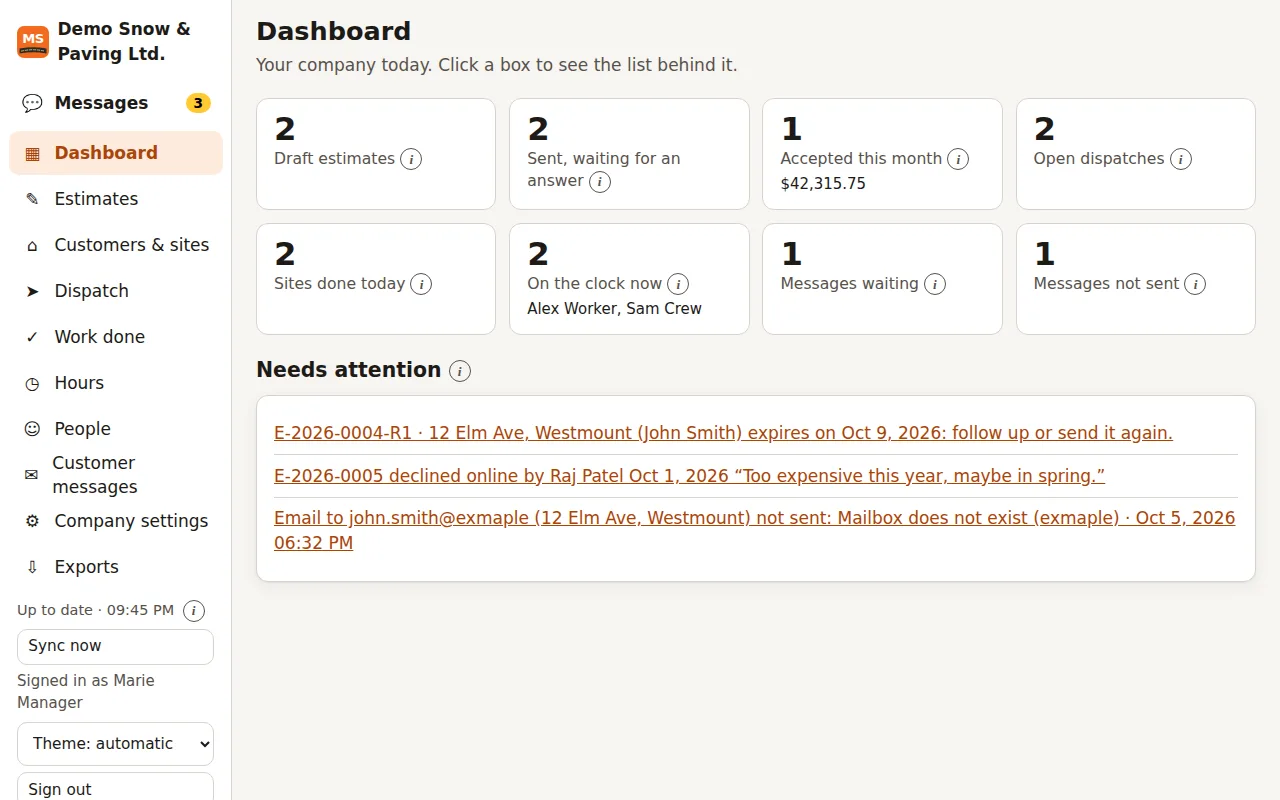
Screenshot of the web portal with sample data.
Your numbers, where your bookkeeper works
Download customers, sites, estimates, visits and hours as CSV or Excel. Bring customers and accepted jobs into QuickBooks Online (CSV) or QuickBooks Desktop (IIF) with step-by-step instructions on the page.
- No retyping from paper
- Pick the period; files are made in your browser
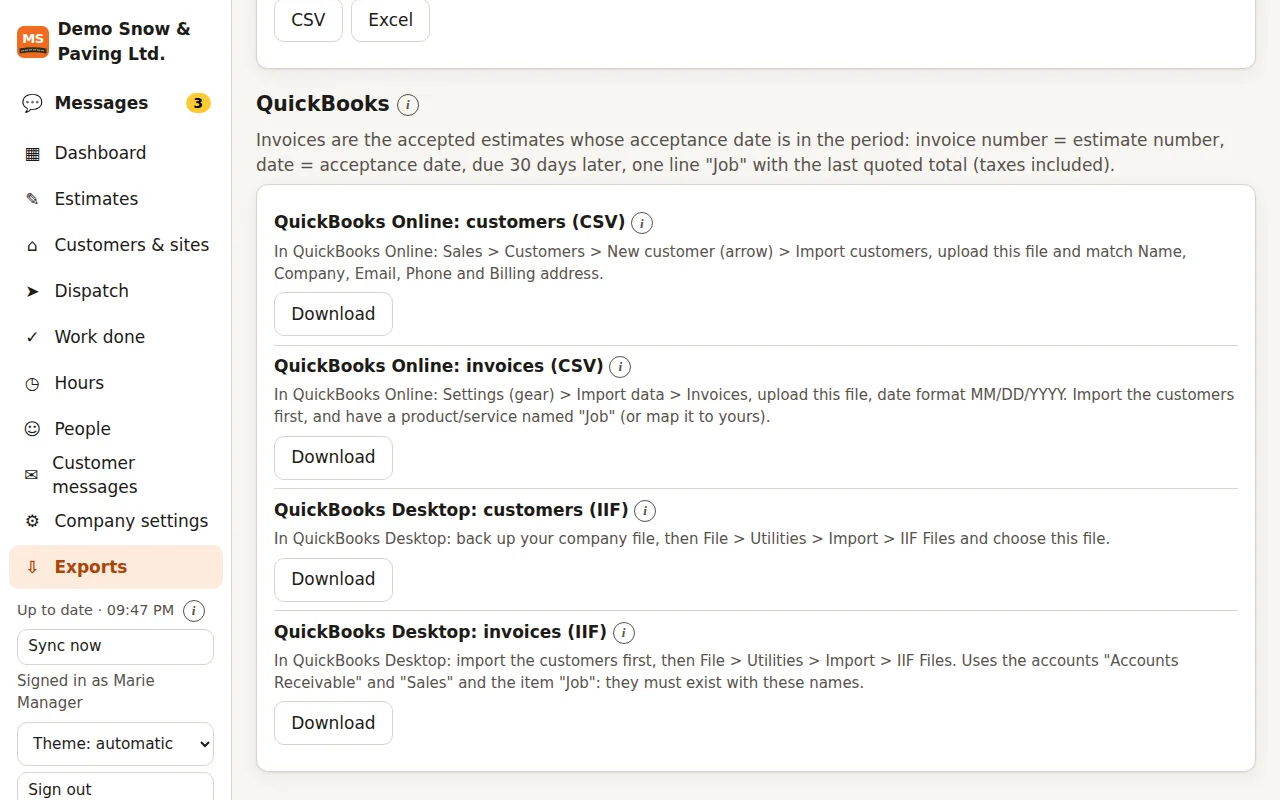
Screenshot of the web portal with sample data.
From the signed quote to the money in the bank
Invoices and online payments
Invoice a quote, a deposit or a period of visits. Customers pay by card or bank debit through Stripe once you connect your Stripe account, and reminders go out by themselves.
Contracts signed online
Seasonal, per push, per item, per snow event, per visit or time and materials. The customer signs on their phone, and the invoices follow the contract.
A page for each customer
Customers sign in with a link sent by email: their quotes, invoices, contracts and visits with proof photos. They pay there and ask for new work.
QuickBooks Online sync
Connect once: invoices and payments go to QuickBooks Online, and payments and customer changes come back, with a log of every sync.
Pay and job costing
Pay runs from the punch clock with overtime and piece pay, payslips, and files for QuickBooks, ADP and Gusto. Each job shows what it cost against its quote.
In four languages
MS Rollout works in English, Spanish, French and German. Each person picks theirs, and each customer gets quotes, invoices and emails in their own.
Made for crews outside, not only the office
Works with no signal
Every action is saved on the phone first and synced when there is signal again, photos included. A dead zone never stops the job.
Dispatch on a map
Run lists for storms or the day's jobs, sites numbered on the map, crews' positions while the run list is open, and an alert with sound for a new run list.
Sunlight mode
Black on white, bigger and bolder text and strong borders, readable in bright sun or snow glare.
Company chat
One-to-one messages, a message to everyone, photos and voice notes, in the app and the portal.
Customer messages
"On my way" and "job done" emails in one tap, written even offline and sent at the next sync. Replies go to the sender.
Roles and privileges
Manager, estimator, crew chief, worker and support crew. A switch per role for what it may do and see; crew chiefs and workers do not see customers or prices unless you turn them on.
Get started in four steps
Start your free trial
Create your company on this website and confirm your email: 3 months free with 30 seats, no card. Your team then installs the Android app and signs in.
Invite your people
Give estimators and crews an invite code, or create their logins. Each person is one seat.
Quote and win
Measure on the map, send the quote and get it signed online.
Dispatch and prove
Put the sites on a run list. Crews clock in, check in and take the photos. You keep the proof.
What MS Rollout replaces
Measuring wheel and a spreadsheetSatellite measuring with your pricesQuotes typed at night, signed on paperQuote PDF signed onlineGroup texts with addressesRun lists on a mapPhotos lost in a camera rollProof log PDF per sitePaper timesheetsPunch clock and hours reportRetyping into QuickBooksCSV, Excel and QuickBooks files
How MS Rollout differs
Many good contractor apps exist. Here is where MS Rollout does things differently.
| What matters | MS Rollout | Many contractor apps |
|---|---|---|
| Made for | Snow removal, landscaping and paving, in one app | General home services, or one trade only |
| No signal | Everything saved on the phone and synced later, photos included | Often only some screens work offline |
| Satellite measuring | On the phone, for estimators and crews, in every plan | Often an office step or a higher plan |
| Paving quantities | Build-up with thickness and tonnage per layer | Generic line items |
| Outdoor screens | Sunlight mode | Designed for the office |
| QuickBooks | Import files for QuickBooks Online and Desktop, in every plan | Often on higher plans; Desktop is rare |
| Price for 5 people | $159.99 a month, or $1,599.90 a year | Published plans from about $30 to $700 a month |
Based on the public feature and price pages of popular contractor apps, checked October 5, 2026. QuickBooks is a trademark of Intuit Inc.; MS Rollout is not affiliated with Intuit.
One simple plan. Pay for the people who use it.
Every feature in every plan. Add seats for the season, remove them at renewal.
Every feature, for your whole company
$59.99 USD / month
Includes 1 seat and the Ballpark price tool. Each extra seat: $25 / month.
Monthly: $59.99 a month with 1 seat, plus $25 a month for each extra seat. Yearly: $599.90 a year with 1 seat, plus $250 a year for each extra seat.
Free for 3 months. Every new company starts with a 90-day free trial with 30 seats. No card needed; nothing is charged during the trial.
- Android app for managers, estimators and crews
- Web portal for the office at app.msrollout.com
- Quotes, online approval, dispatch, proof of service, punch clock, chat
- CSV, Excel and QuickBooks export files
- 30-day money-back guarantee
What will it cost?
A seat is one person who signs in to the app: a manager, an estimator or a crew member.
$159.99 / month
$59.99 for the plan with 1 seat + 4 extra seats × $25
Prices in US dollars. Sales tax or VAT, where it applies, is added at checkout by Paddle, our reseller.
Questions contractors ask
What is MS Rollout?
Software for snow removal, landscaping and paving contractors: an Android app for estimators, managers and crews, and a web portal for the office. It covers estimates drawn on the satellite map, quotes signed online, dispatch run lists with crew GPS, proof of service with photos, a punch clock, company chat, customer emails and exports.
After the yes, it also invoices and takes payments online, has contracts signed online, gives each customer their own page, syncs with QuickBooks Online and works out pay and job costs. It works in English, Spanish, French and German.
Can I try it before I sign up?
Yes. The sample account is the real web portal with a made-up snow removal, paving and landscaping company: estimates, the map, dispatch, crews and machines, invoices and pay, and a tour of the phone app. Nothing you do there is saved. When you sign up your own company, you can also start it with examples (made-up customers, sites, estimates, a job, a crew and machines) and remove them all with one button.
Which languages does it speak?
English, Spanish, French and German, in the app and in the web portal: each person picks their language. Each customer gets quotes, invoices, contracts and emails in their own language.
Does it work without cell signal?
Yes. Everything you do is saved on the phone first and synced with the server when there is signal again, including photos. Online approval links need a connection to send.
Which devices does it run on?
The app runs on Android phones and tablets and is installed from our download page. The web portal works in any modern browser, on a Windows PC, a Mac or a tablet.
How much does it cost?
The Company plan is $59.99 a month with 1 seat, plus $25 a month for each extra seat, or $599.90 a year with 1 seat plus $250 a year for each extra seat. The Ballpark price tool for your website is included. Prices are in US dollars; tax is added at checkout where it applies. See Pricing.
Is there a free trial?
Yes. Every new company gets 3 months (90 days) free with 30 seats, and no card is needed. The trial starts when you confirm your company's email. Choose a plan in the web portal whenever you are ready; if you have chosen one, the first payment is taken when the trial ends.
Can I get my money back?
Yes. You get a full refund of your first payment if you ask within 30 days. See the Refund Policy.
Does it track my crews all the time?
No trail is kept. While signed in, a phone shares its latest position with the company at each sync (about every 2 minutes with the app open, about every 15 minutes with it closed); while a run list is open, every 3 minutes or after 50 m of movement, screen off too. The server keeps only the latest position, and signing out stops it. Positions are also stamped on visits, photos and clock-ins as proof of service.
Who owns our data?
You do. Your customers, sites, drawings, quotes, visits, photos and hours belong to your company. We do not sell data or show ads, and you can export it or ask us to delete it. See the Privacy Policy.
Can I export to QuickBooks or Excel?
Yes. The web portal exports customers, sites, estimates, visits and hours as CSV or Excel, and makes import files for QuickBooks Online (CSV) and QuickBooks Desktop (IIF).
With QuickBooks Online you can also connect your company once and let invoices and payments sync by themselves.
How do I reach you?
Use the contact form or email supports [at] msrollout.com. Managers can also choose MS Rollout support in the chat of the app or the web portal.
How do my crews join?
The manager gives each person an invite code for their role, or creates their login. Each person who signs in to the app uses one seat.
Run your next job on MS Rollout
Start with 3 months free for up to 30 people, no card needed: create your company on this website and confirm your email. Your team installs the Android app and signs in; your office uses the web portal with the same accounts.
Then $59.99 a month with 1 seat · extra seats $25 · 30-day money-back guarantee